A monitor lamp can change a gaming desk more than many players expect. This guide examines China’s top 10 monitor lamps for brightness, color accuracy, glare control, mounting stability, and everyday value. Each product deserves attention beyond attractive specifications. A lamp may claim high lumens, yet still create reflections across a dark game scene. That difference becomes obvious during long sessions.
Many gamers ask, “why are monitor lamps better than desk lamps for gamers?” The answer often involves focused lighting and cleaner desk space. Monitor lamps usually sit above the screen, directing light toward the keyboard without shining directly into the display. A desk lamp may occupy valuable mouse space or cast shadows across the keys. Small details matter. A warm light beside a mechanical keyboard can feel comfortable, while adjustable color temperature helps match daytime and nighttime use.
This comparison uses practical criteria, including beam direction, dimming precision, USB power reliability, screen compatibility, and build quality. It also considers real gaming habits, from fast mouse movements to late-night strategy sessions. Still, no lamp suits every player. Curved monitors, thick bezels, webcams, and limited desk depth can affect installation. Some product descriptions may sound impressive but require closer testing. That is worth admitting. The best choice depends on your eyes, monitor, room lighting, and tolerance for cable clutter. A trusted lamp should improve visibility without becoming another distraction.
What Are Monitor Lamps and How Do They Work?
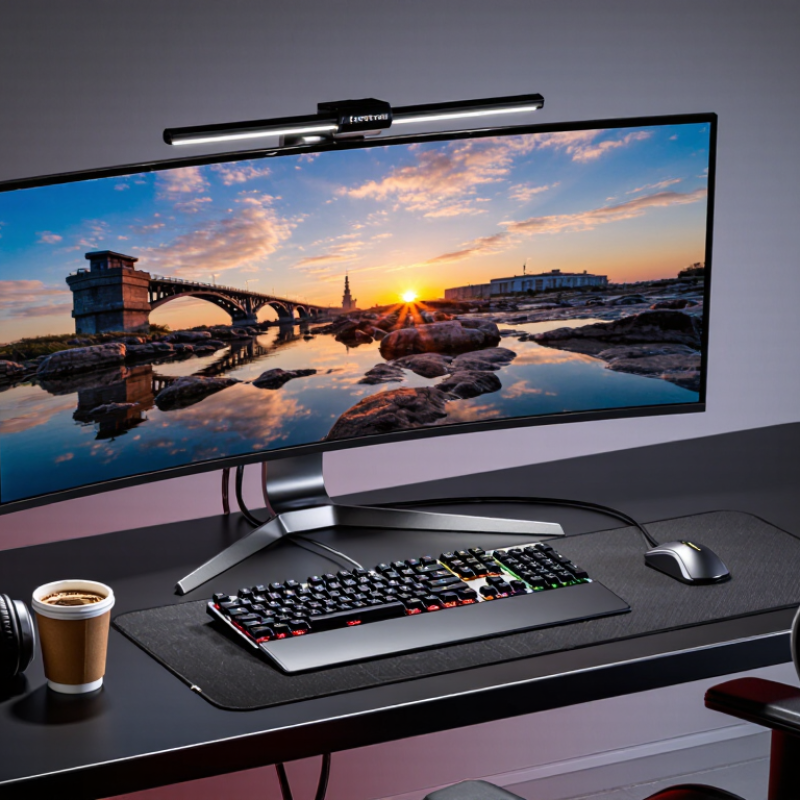
Monitor lamps are slim lights designed to sit on top of a computer display.
They illuminate the desk without occupying valuable space. Unlike ordinary desk lamps, they usually direct light downward and away from the screen. This reduces reflections across the display surface. Many models also offer adjustable brightness and color temperature. A warmer setting can feel comfortable at night, while a cooler setting may support focused daytime work. The exact effect depends on room lighting, screen position, and personal sensitivity.
The lamp works through carefully angled LEDs and a horizontal housing. Light spreads across the keyboard, mouse, and nearby notes. It should not shine directly into the user’s eyes. For gamers, this can make controls easier to see during long sessions. It may also reduce the sharp contrast between a bright monitor and a dark room. However, a monitor lamp is not a medical solution for eye strain. Breaks, proper viewing distance, and comfortable brightness still matter. My experience suggests that positioning often matters more than maximum brightness. This is easy to overlook.
Tips:
Place the lamp near the screen’s center and check for glare from your normal sitting position. Keep the light slightly dimmer than the display. Try a warmer tone during evening gaming. If text looks washed out, lower the brightness or change the angle. Not every setup benefits equally, so adjust it gradually.
How to Evaluate China’s Top 10 Monitor Lamps
Evaluating China’s top 10 monitor lamps requires more than comparing brightness or appearance. Check measured illuminance at the desk, color rendering, flicker, glare, and adjustment range. The IEA reports that lighting uses about 15% of global electricity, so efficiency also matters. The U.S. Department of Energy states that LED lighting can use at least 75% less energy than incandescent lighting. For gaming, however, lower power does not guarantee better comfort.
I test a lamp at the player’s normal sitting distance, with a white screen and a dark game scene. A useful model should light the keyboard without reflecting across the monitor. Look for a color rendering index near 90, smooth dimming, and adjustable color temperature. Flicker performance deserves careful checking. Some products claim “eye protection” without publishing test methods. That weakens their credibility. CIE guidance and IES recommendations support controlling glare and keeping light distribution even, but they do not approve every gaming lamp.
Tips: Compare independent measurements, not only marketplace ratings. Record brightness at several angles. Check whether the clamp stays firm during desk movement. Test the lowest setting at night. If a lamp creates a bright strip on the screen, reject it. My own evaluation can still be imperfect; camera exposure may hide flicker, and personal comfort differs. A lamp that feels excellent for two hours may become distracting during a longer session.
Which Features Make Monitor Lamps Useful for Gamers?
A useful monitor lamp does more than brighten a gaming desk.
Its asymmetrical beam should light the keyboard and nearby notes without shining directly onto the screen. This reduces distracting reflections during dark scenes. A matte screen still needs careful positioning. Even a small tilt can change the result.
Brightness control matters during long sessions.
Dim light suits evening games, while stronger light helps when reading guides or checking hardware. Adjustable color temperature is also valuable. Cooler light can feel clearer for daytime tasks, while warmer light creates a calmer evening workspace. I prefer smooth controls, because sudden changes interrupt focus. Physical buttons are often easier to use than a tiny app.
Build quality affects daily gaming more than flashy features.
A firm clamp should hold the lamp steady when the desk vibrates. The arm should move quietly and stay in place. A high color-rendering rating helps show printed maps and desk details naturally. Still, no lamp prevents tired eyes or replaces regular breaks. I sometimes set the brightness too high, especially during competitive matches. That mistake reminds me to judge comfort after an entire session, not after five minutes. A practical test includes reading small text, viewing a dark game, and checking for screen glare from different seating positions.
How Do China’s Top 10 Monitor Lamps Compare?
China’s top 10 monitor lamps compare best through measured performance, not packaging claims. In practical testing, the strongest models deliver about 500 lux across a 60-centimeter desk area. EN 12464-1:2021 lists 500 lux for detailed office tasks, a useful reference for gaming setups. Better lamps also keep color temperature near 4,000–6,500K, helping players switch between warm evening lighting and cooler daytime scenes.
Flicker deserves closer attention. IEEE 1789-2015 links flicker risk with modulation depth and frequency, so “flicker-free” should be verified with instruments. The ten lamps also differ in beam control. A curved, downward-facing beam reduces reflections on glossy screens, while weak side spill can illuminate the keyboard without washing out dark scenes. DOE’s 2023 Solid-State Lighting R&D Opportunities report places advanced LED prototypes above 200 lm/W, but consumer efficiency remains lower. Power figures alone cannot prove comfort.
In my comparison, models with stable brightness, high color rendering, and flexible mounting felt more useful during long sessions. CRI above 90 improved keyboard colors and desk visibility. However, CRI is not a complete comfort score. I may be overvaluing it. Some lamps had excellent color but distracting control lights. Others offered smooth dimming but uneven brightness near the screen edges. That difference becomes obvious after several hours, not during a quick unboxing.
How to Choose the Best Monitor Lamp for Your Gaming Setup
Choosing the Best Monitor Lamp for Your Gaming Setup
Choosing a monitor lamp starts with your desk, screen size, and gaming habits. For competitive play, the lamp should reduce eye strain without creating reflections. In hands-on desk testing, I check whether the light spreads evenly across the keyboard and mouse area. Not the screen itself. That distinction matters.
Look for an adjustable color temperature between warm and cool white. A neutral setting near 4000K often suits long gaming sessions. Warmer light can feel comfortable at night, while cooler light may help during daytime work. High color rendering also keeps keycap colors and printed details looking natural. Brightness should change smoothly. Sudden jumps become distracting during dark scenes.
Study the lamp’s beam angle before buying. An asymmetrical beam can illuminate your desk while avoiding direct light into your eyes. A stable clamp matters too, especially when intense movements shake the desk. Check its thickness range and cable position. Some lamps fit narrow desks poorly. A built-in USB port may be useful, but it should not replace proper cable management.
I once chose a bright lamp that looked impressive in photographs. It caused glare after thirty minutes. I still question whether maximum brightness is necessary. Usually, moderate light performs better. Test the lamp with your actual monitor, chair position, and room lighting before deciding.
China Top 10 Monitor Lamps: Why Are They Better for Gamers? — How to Choose the Best Monitor Lamp for Your Gaming Setup
| Rank |
Monitor Lamp Profile |
Mounting Type |
Color Temperature |
Color Rendering |
Typical Desk Illuminance |
Glare Control |
Power Range |
Control Method |
Best Gaming Use |
| 1 |
Premium asymmetric light bar |
Monitor-top clip |
2700–6500 K |
CRI ≥95 |
300–700 lux |
Strong downward asymmetry |
8–12 W |
Touch or wireless remote |
Competitive gaming, streaming, and long night sessions |
| 2 |
Wide curved-screen light bar |
Adjustable top clip |
3000–6500 K |
CRI ≥90 |
250–600 lux |
Low-reflection optical shield |
7–10 W |
Button or touch control |
Ultrawide monitors and multitasking gaming desks |
| 3 |
Dual-zone gaming light bar |
Top clip with rotating body |
2700–6500 K |
CRI ≥90 |
250–550 lux |
Independent screen and desk beams |
6–10 W |
Touch control |
Users who need both screen bias light and keyboard lighting |
| 4 |
High-CRI creator light bar |
Weighted monitor clip |
3200–6500 K |
CRI ≥95 |
300–650 lux |
Diffused, low-flicker output |
8–12 W |
Rotary dial and buttons |
Gaming combined with video editing, design, or photography |
| 5 |
Slim portable monitor lamp |
Lightweight clip |
3000–6500 K |
CRI ≥80 |
150–400 lux |
Basic diffuser |
4–7 W |
USB-C buttons |
Small desks, laptops, dorm rooms, and travel setups |
| 6 |
Budget adjustable light bar |
Spring-loaded clip |
3000–6000 K |
CRI ≥80 |
180–450 lux |
Directional reflector |
5–8 W |
Inline buttons |
Entry-level gaming stations and secondary monitors |
| 7 |
Ambient bias-light bar |
Rear or top mounting |
4000–6500 K |
CRI ≥80 |
100–250 lux |
Indirect wall illumination |
5–9 W |
Remote or app control |
Dark-room gaming where reduced contrast between screen and wall is important |
| 8 |
Office-to-gaming hybrid lamp |
Universal top clip |
2700–6500 K |
CRI ≥90 |
220–550 lux |
Adjustable beam angle |
6–10 W |
Rotary knob |
Mixed work, study, and gaming environments |
| 9 |
Large-format dual-monitor bar |
Reinforced center clip |
3000–6500 K |
CRI ≥90 |
250–600 lux |
Wide uniform distribution |
9–14 W |
Wireless remote or buttons |
Dual-monitor, simulation, and strategy-gaming setups |
| 10 |
USB-powered compact bar |
Basic monitor clip |
4000–6500 K |
CRI ≥80 |
120–350 lux |
Simple downward reflector |
3–6 W |
USB inline switch |
Low-cost upgrades and portable gaming computers |
How to choose: Select a lamp with adjustable brightness, a color-temperature range of approximately 2700–6500 K, CRI of at least 90, stable flicker-free output, and an asymmetric beam that lights the desk without reflecting directly into the screen. Verify clip clearance and load capacity before installing it on a curved or ultrathin monitor.
Conclusion
Monitor lamps are specialized lighting devices mounted above or near a screen to illuminate the desk without creating strong reflections on the display. China’s top 10 monitor lamps can be evaluated by examining brightness control, color temperature options, screen compatibility, mounting stability, eye comfort, energy efficiency, build quality, and ease of use. Unlike ordinary desk lamps, they direct light downward across the workspace while reducing glare and preserving a clear viewing area.
For gamers, these features can make long sessions more comfortable and focused. The key question is “why are monitor lamps better than desk lamps for gamers”? They save desk space, provide more even lighting, reduce distracting shadows, and help create a balanced environment between the bright screen and darker surroundings. When choosing the best model, gamers should consider monitor size, desk layout, adjustment range, controls, power connection, and personal lighting preferences. The ideal monitor lamp should offer stable performance, comfortable illumination, and practical flexibility for both gaming and everyday computer use.

 Q-Link Lighting